Our goal at VoiceDoc is to use AI to take away the boring parts of your jobs, not the things that we enjoy. Admin can sometimes get the better of us, that’s why we’ve focused on the 2 biggest administrative battles Tradies face every day. Daily reports and creating invoices.Our technology turns your voice note into a professional report or invoice ready to send to your boss or client. We take seconds to produce what can take hours per week.
Try us out on our free trial.
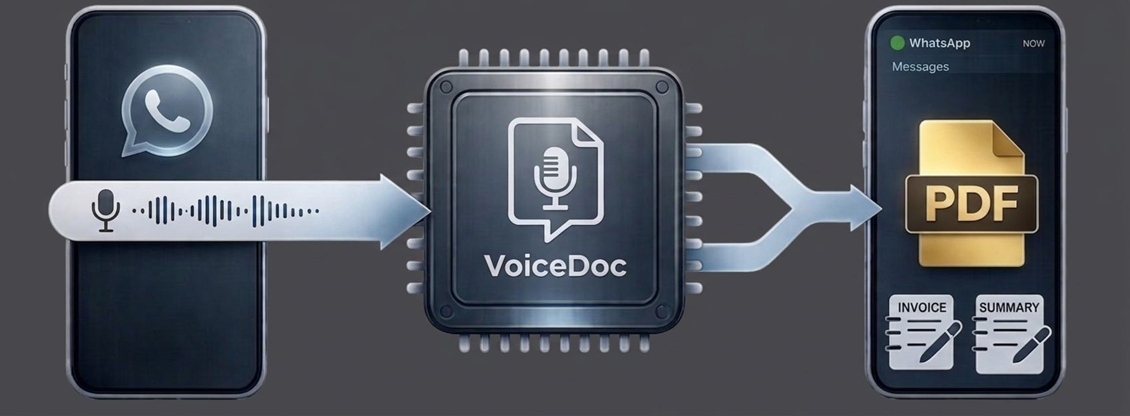
Onboarding: From Sign-Up to First Note
Select Your Plan: Choose the tier that fits your crew and pay via our secure Stripe checkout.
Complete Your Profile: You’ll be redirected to a Branding Setup form. Upload your logo, ABN, and bank details so your PDFs look professional from Day 1.
Save the Contact: You’ll receive a "Welcome" WhatsApp, usually sent within a few hours. Save this number as "VoiceDoc" in your phone.
Send Your First Note: Record a 30-second update. Within seconds, VoiceDoc will reply with a branded PDF ready to be shared. That's it. Keep using as per your business needs. Business plans can be updated anytime
Need help with what to say?
You don’t need to talk like a robot but here are some pointers.
Example 1: The Site Diary
"Hey, Site Diary for the Miller Project. It’s Tuesday the 14th. Clear skies. We had 4 chippies on site. Finished the first-floor framing and started the rough-in on the east wing. Concrete was 45 mins late which held us up, but we caught up by 4pm. Tomorrow we need the inspector here at 9 AM for the slab sign-off. No variations. Cheers."Example 2: The Invoice
"Hey, create invoice for Sarah Miller at 55 High St. Job is to install toilet and sink already supplied by customers. $500 plus GST. Add estimated itemisation.”
| Do's | Don't |
|---|---|
| State Your Intent First: Start every note by saying, "Hey, create an [Invoice/Site Diary] for..." This helps the with the workflow, you don’t want a site diary as an invoice. | Don't record near loud machinery: If a jackhammer is going 2 meters away, the AI might "hear" static as words. Step into the cab or a quiet corner. |
| Speak Like a Human: You don’t need to be formal. Just describe what happened as if you’re talking to a mate on the way to the ute. | Don’t send multiple voice notes, this will eat into your credits, cancel and try again if you missed a few points |
| Be Specific with Data: Instead of saying "A few boys," say "3 chippies and 2 sparkies." If there’s a variation, be specific. | Don't rush your speech: You don’t need to talk like a robot, but if you mumble or talk at 100mph, "Slab" might become "Slap." |
| Mention the 'Next Steps': Always end with what needs to happen tomorrow. It makes your "Action Items" section look professional. | Don't worry about 'Ums' and 'Ahs': Our AI is trained to ignore filler words. Just keep talking—it will filter out the noise. |
| Record Fresh: Capture the note while you’re still on-site (maybe when you get back into your ute). Details get lost once you get home to the couch. | Don't skip the review: VoiceDoc is your assistant, not your boss. Always give the PDF a 10-second "sanity check" before forwarding it to a client. |
Helping Tradies save time.
© 2026 VoiceDoc | Pratik Mistry ABN 77448693240